12 Clever Home Office Ideas for a More Functional Space
A home office works best when it supports the way you actually spend your workday. A thoughtful layout can make a spare room feel more useful, turn an overlooked corner into a productive nook, or make a shared space easier to keep organized.
These home office ideas pair practical upgrades with approachable design details, from built-in storage and better lighting to natural materials and ergonomic furniture. Each one can be adapted to the room, equipment, and work habits you already have.
Whether you are setting up a full-time office or carving out a small spot for occasional projects, start with the change that would make the biggest difference. Then layer in the details that help your workspace feel comfortable, focused, and personal.
1. Create a Warm Wood Desk Wall with a Pegboard
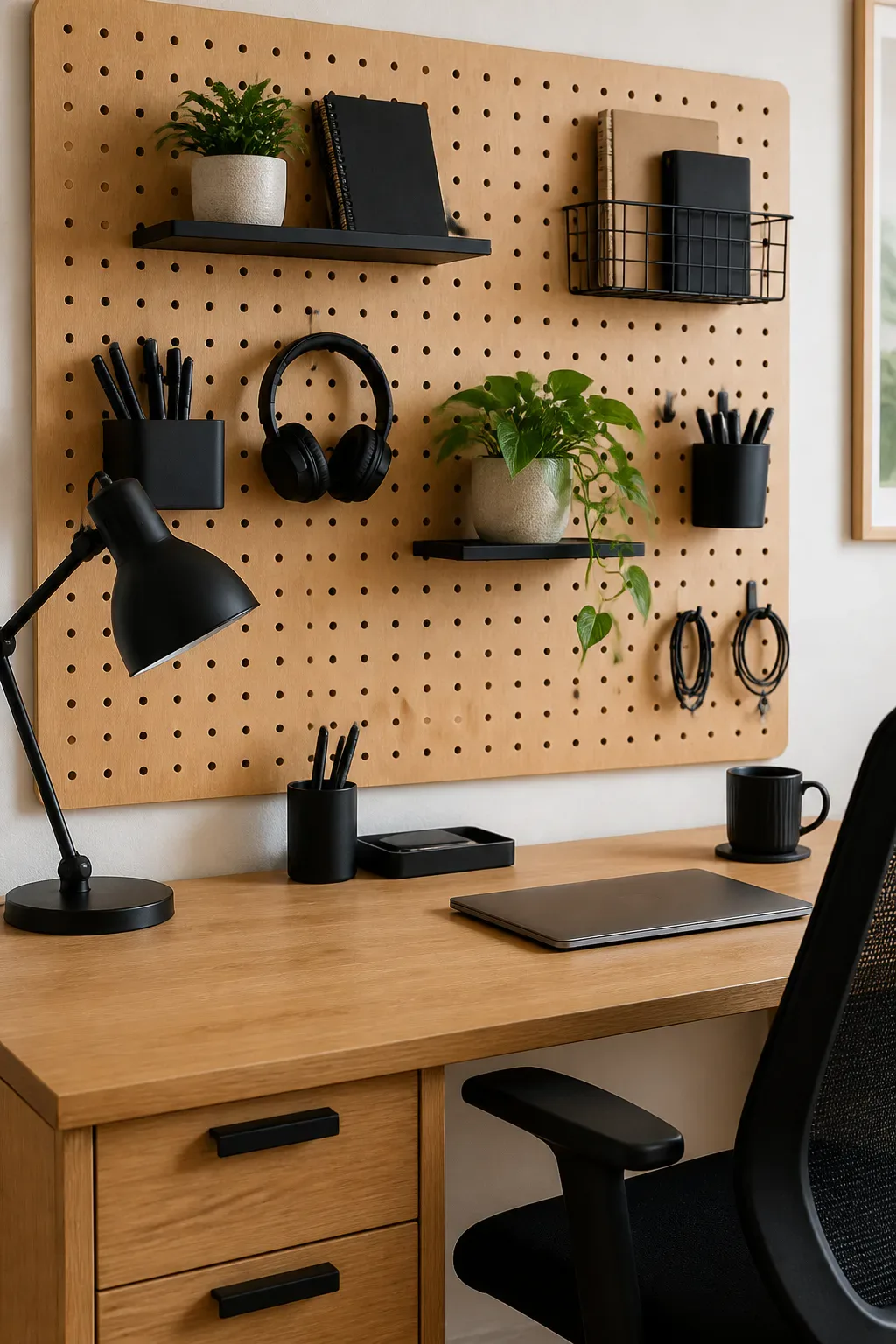
A natural wood desk brings warmth to a work area, while matte-black details add a clean, modern contrast. Together, they create a balanced look that can feel both calm and purposeful, especially in a spare bedroom or a dedicated office with neutral walls.
Mounting a pegboard above the desk makes frequently used supplies easy to reach without filling the work surface. It also gives you flexible storage: hooks, small shelves, and containers can be moved around as your routine changes.
How to pull it off
Choose a desk size that leaves enough room to move the chair and open nearby doors or drawers. Keep the pegboard within comfortable reach, and arrange it so the items you use every day are easy to grab.
- Repeat black in a task lamp, chair frame, or drawer pulls.
- Use small containers for pens, chargers, and other loose supplies.
- Leave some pegboard space open to keep the arrangement from feeling crowded.
The wood-and-black palette gives the office a clear visual anchor while keeping useful storage close at hand.
2. Build a Sit-to-Stand Workstation
An adjustable desk makes it easier to change positions during the workday without rearranging the room. It can be a useful centerpiece in a dedicated office, but it can also work in a bedroom or shared space where one flexible workstation has to meet several needs.
For a smooth transition between sitting and standing, plan the whole setup around the desk rather than treating the desk as a standalone upgrade. Your monitor, keyboard, and everyday supplies should stay easy to use at both heights, and cables need enough slack to move safely.
Set up for easy adjustments
Keep the desktop relatively uncluttered so raising and lowering the desk does not shift items or catch cords. A monitor arm, cable clips, and a small tray for essentials can help the workstation stay orderly as its height changes.
- Place the screen at a comfortable viewing height in both positions.
- Keep frequently used items within easy reach while seated and standing.
- Route cables with enough room for the desk’s full range of movement.
- Alternate positions in a way that feels comfortable for your routine.
A sit-to-stand setup is most useful when changing position feels simple, not like a project.
3. Frame a Window with Built-In Bookshelves
Bookshelves on either side of a window make a home office feel considered and create a natural frame for the brightest part of the room. This layout suits a dedicated office, a study, or a larger bedroom where you can keep the desk close to daylight without giving up useful storage.
Floor-to-ceiling shelves make use of vertical space, while lower cubbies can hold baskets, files, or equipment that you do not want on display. Keeping the window area open helps preserve the light and gives the room a focal point rather than making the desk feel tucked away.
Plan the shelves around the light
Before choosing shelf depths, consider how the window opens and where sunlight falls during your work hours. Balance books and closed storage with open sections so the whole wall feels functional but not overly dense.
- Keep the desk positioned to benefit from daylight without blocking the window.
- Use matching shelves for a symmetrical, built-in look.
- Store heavier or less decorative items in lower baskets and cabinets.
- Leave some shelves open to display a few meaningful objects.
The result is a workspace that connects storage, natural light, and a strong architectural feature.
4. Mount Dual Monitors Above the Desk

Two monitors can be helpful for research, spreadsheets, design work, or any task that involves switching between windows. Mounting them on an articulated arm lifts their stands off the desk, freeing up space for a keyboard, notebook, and other essentials.
This arrangement works well on a dedicated desk where screens are a major part of the setup. It can also make a smaller workstation feel less crowded, provided the desk and mount can support the equipment and the screens are positioned comfortably for your line of sight.
Arrange screens for comfortable viewing
Set the monitors so you can look straight ahead at the screen you use most, with the second angled slightly toward you. Check the arm’s fit and the desk’s mounting options before installation, then adjust the screens to reduce neck turning.
- Measure the desk edge and check that the arm clamp can attach securely.
- Keep the top portion of the screens near eye level.
- Place the main monitor directly in front of your chair.
- Route power and display cables along the arm where possible.
A well-positioned monitor arm gives you more usable desk space without sacrificing a clear, comfortable view.
5. Soften the Office with Felt Panels and a Rug
Hard surfaces can make a home office feel echoey, especially during video calls. Felt wall panels and a large area rug add soft texture that can help temper the room’s sound while making the workspace feel warmer and less like a purely functional corner.
This combination suits a dedicated office, a multipurpose room, or a desk set up in a bedroom with bare floors and reflective walls. Panels can add color or a subtle pattern behind the desk, while a rug helps define the work zone within a larger room.
Layer softness thoughtfully
Choose materials that fit the way the room is used and are easy to keep clean. Position panels near the desk or call area, and make sure the rug is large enough to feel intentional without interfering with the chair’s movement.
- Use felt panels as a backdrop for the desk or video calls.
- Select a rug that lets the chair roll comfortably.
- Repeat one color from the panels in nearby accessories.
- Add upholstered seating if the room still feels hard or stark.
Soft finishes bring visual comfort and can make a work area blend more naturally into the rest of your home.
6. Add a Sleek Monitor Light Bar
A monitor light bar adds task lighting without taking up desk space like a traditional lamp. It sits above the screen and directs light toward the keyboard, paperwork, or desktop, making it a practical option for compact workstations and desks already crowded with equipment.
This style of lighting can also keep the work surface looking streamlined. It is especially handy when the room’s overhead light feels too harsh for focused tasks, though it should complement—not replace—general room lighting when you need to see the whole space clearly.
Set up a useful, comfortable glow
Position the light so it brightens your work area without creating distracting reflections on the display. Check that the bar fits your monitor and that its controls are easy to reach; adjustable brightness can help you respond to different light conditions.
- Test the light from your normal seated position.
- Angle it toward the desk rather than directly at your eyes.
- Use it to illuminate notes and the keyboard during focused tasks.
- Keep a separate ambient light source for the rest of the room.
A slim light bar is a small change that can make a compact desk easier to use after daylight fades.
7. Convert an Under-Stair Nook into an Office
The space beneath a staircase can become a useful office nook when a full room is not available. A floating desktop and narrow wall shelves can turn an awkward corner into a defined work spot while leaving the surrounding floor open.
Because under-stair areas vary in height and depth, the layout should follow the shape of the space. The tallest end may suit a monitor or storage, while the lower section can hold a small cabinet or remain open for legroom. This idea also adapts well to a wide hallway alcove.
Make the most of an unusual footprint
Measure the nook carefully before choosing a desk depth, chair, or shelves. Keep everyday items close to the seat and avoid placing storage where it will make it difficult to move in and out of the workspace.
- Use a floating desktop to preserve a light, open feel.
- Choose shallow shelves for notebooks and small supplies.
- Place the chair where ceiling height allows comfortable movement.
- Add a focused light if the nook is far from a window.
With a clear surface and a few well-planned shelves, an overlooked spot can become a practical place to work.
8. Create a Comfortable Ergonomic Desk Zone

A supportive chair and a thoughtfully arranged desk can make long work sessions feel more manageable. Centering an adjustable task chair at the workstation gives the space a clear purpose and makes it easier to sit with your screen, keyboard, and work materials in a comfortable position.
This setup belongs in any home office, whether it occupies a full room or a corner of a shared space. The goal is not to fill the area with complicated equipment, but to make the items you use most accessible and reduce the need to twist, reach, or hunch throughout the day.
Arrange the essentials around your posture
Adjust the chair so your feet feel supported and your arms can rest comfortably while typing. Position the monitor in front of you, then place frequently used items nearby without letting accessories crowd the work surface.
- Choose a chair with adjustments that suit your body and desk.
- Keep the keyboard and mouse close enough to avoid reaching.
- Set the screen at a comfortable height and viewing distance.
- Leave clear floor space so you can move and change position.
A well-organized desk zone supports both comfort and focus, making it easier to settle into work.
9. Set Up a Dedicated Focus Timer Station
A physical timer gives you a visible way to structure a work session without opening your phone and risking a detour into notifications. Placed on the desk, it can become a simple cue to focus on one task for a set period, then pause before moving on.
This idea is especially useful in a small office where a few deliberate routines can help distinguish work time from home time. A flip-style timer, digital countdown clock, or straightforward mechanical timer can all work; choose a format that is easy to set and read at a glance.
Give the timer a purposeful place
Keep it visible but out of the way of your keyboard and writing area. Pair it with a short written task list so you know what to work on before starting the countdown, and use breaks to stretch or reset your desk.
- Place the timer where you can see it without turning away from the screen.
- Choose a simple style that does not require frequent phone use.
- Write down one clear task before each focused work block.
- Use pauses to step away from the desk when practical.
A dedicated timer station makes focus feel like part of the room’s setup, not another app to manage.
10. Design a Tidy Charging Station
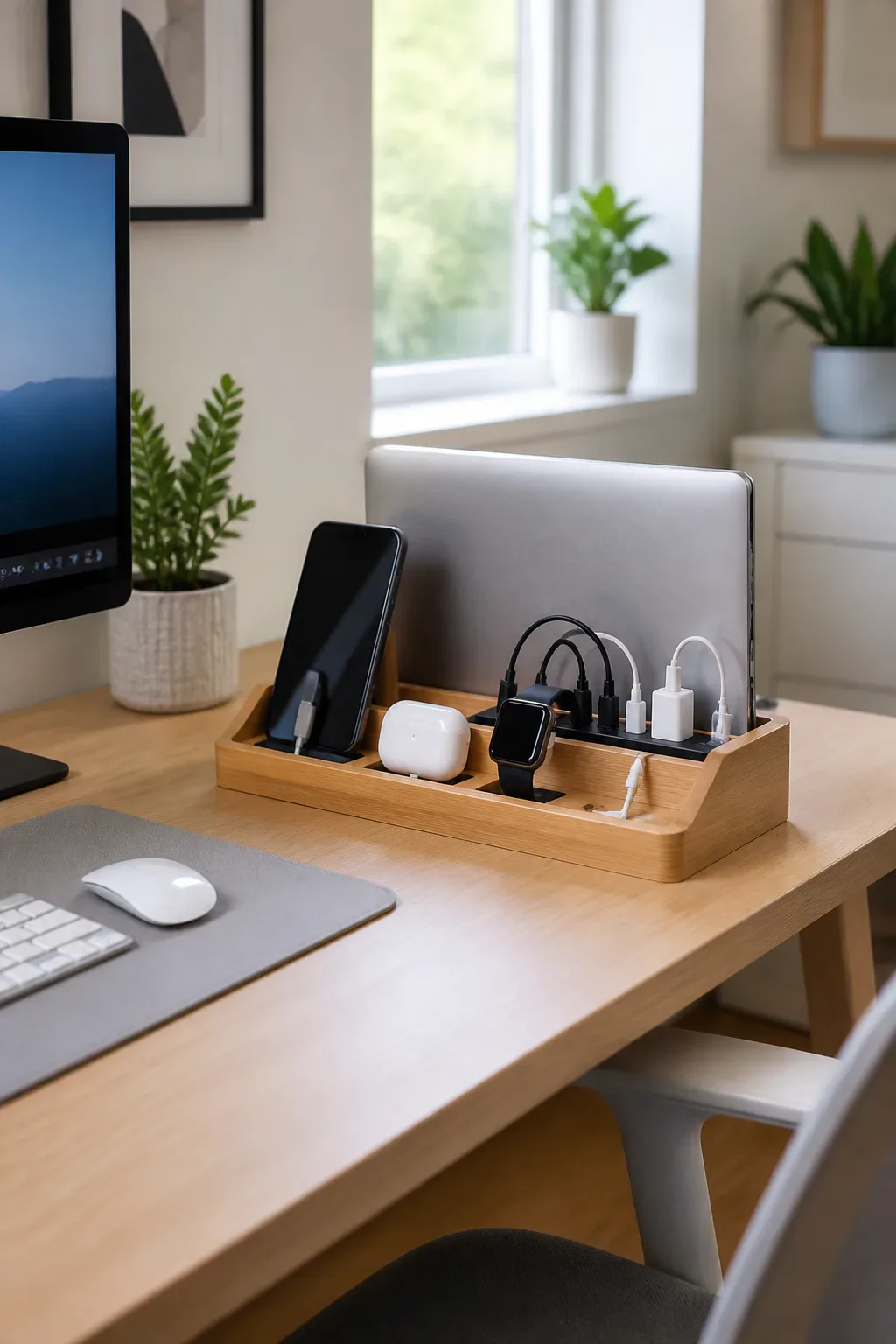
Phones, earbuds, laptops, and other everyday devices can quickly create a tangle of cords across a desk. Grouping charging gear in one compact area makes it easier to keep devices powered while giving the rest of the work surface room for actual work.
This setup can fit on a full-size desk or in a small office nook, as long as the charger is easy to reach and the cables are routed neatly. A tray or small organizer can help contain the area, while a multi-device charger reduces the number of separate charging spots you need.
Keep power organized and accessible
Think about which devices you charge during the day and which can be plugged in elsewhere overnight. Choose charging equipment that suits your devices, then route cords toward a nearby outlet without crossing your main writing or keyboard area.
- Group daily devices together on a small tray or shelf.
- Use cable clips to guide cords along the desk edge.
- Keep the charger close enough to use without stretching cables.
- Label similar cords if you often unplug and move devices.
A defined charging spot keeps essential electronics close without letting them take over the entire desk.
11. Dock Your Laptop Vertically Beside the Monitor

If you use an external monitor and keyboard, a vertical laptop stand can store your open or closed laptop upright beside the screen. This frees up valuable desktop area while keeping the computer close by for charging, file access, or a second display when needed.
The setup suits smaller desks and minimalist workstations where every bit of surface space matters. It also gives the laptop a consistent home instead of leaving it spread across the desk, but the stand should fit the device securely and allow any required ports or cables to connect easily.
Build a simple docking routine
Place the stand near the monitor, then connect the laptop to the display and accessories with a cable arrangement that is easy to disconnect. Leave enough room around the stand to remove the computer without knocking over nearby items.
- Check that the stand matches your laptop’s thickness and orientation.
- Keep the external keyboard and mouse centered in front of the monitor.
- Route connection and charging cables along one side of the desk.
- Leave space for ventilation and convenient access to ports.
Vertical docking gives a compact workstation a cleaner footprint while keeping your laptop ready to use.
12. Bring Greenery and Warm Wood onto the Desk

A small plant and a warm wood accent can soften a workspace without requiring a full redesign. Greenery adds a natural note to a desk filled with screens and equipment, while a wood mat or organizer brings texture that can make the setup feel more personal.
This is an easy idea for a home office, bedroom desk, or shared work surface, especially when you want to add warmth without using much space. Choose a plant that fits the available light and your care routine, then keep the rest of the arrangement simple so the desktop remains useful.
Style a low-maintenance natural touch
Set the plant where it will not block your monitor or crowd your main work area. A compact plant such as a pothos or snake plant may suit a range of setups, but check the light and watering needs of any plant you choose.
- Use a small pot that fits comfortably on the desk.
- Add a wood desk mat, tray, or pencil holder for warmth.
- Keep leaves and soil away from electronics and cables.
- Choose accents that complement your desk’s existing finish.
Natural details bring a softer, more lived-in feeling to the workday without sacrificing function.
Final Thoughts
A useful home office does not have to be large or complicated. A better desk layout, comfortable seating, thoughtful lighting, and a plan for storage can turn a spare room or small corner into a workspace that fits your everyday routine.
Choose one change to start with, then build around what you find most helpful. When practical upgrades work together with personal touches, your office can feel organized, comfortable, and welcoming enough to make settling in easier.